
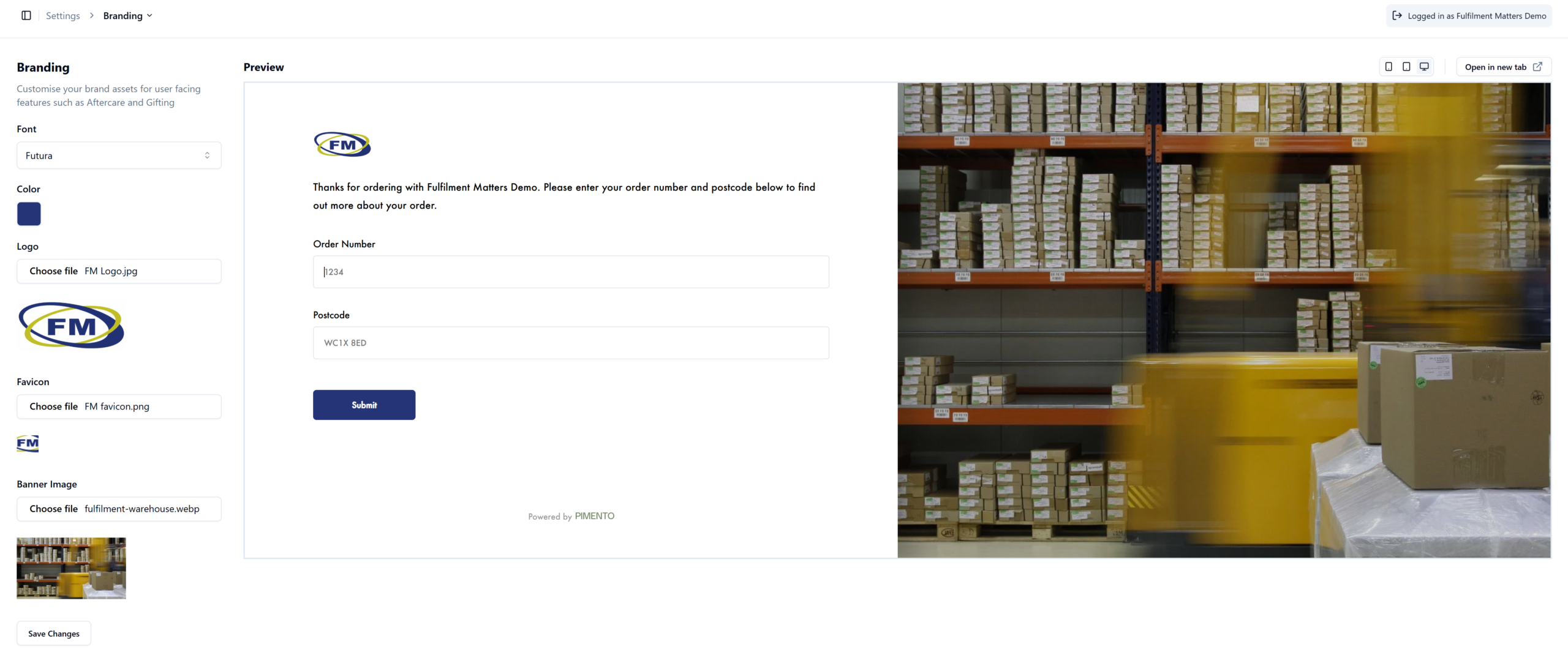
To set up your branded aftercare please follow these steps:-
- In the portal go to Settings > Branding
- Select font style from dropdown menu
- To select the colour of the ‘Submit’ box input Colour (Hex Code).
- Choose Logo by clicking the ‘choose file’ button
- Choose Favicon by clicking the ‘choose file’ button
- Choose Banner Image by clicking the ‘choose file’ button.
- If you want to see how the Aftercare looks click the ‘Preview in new tab’ link on the right hand side of the page.
What is a Favicon?
It is a small website/tab icon which can be found in your browser tab when visiting a page. See examples below of some popular favicons.
I do not know the hex code for the colour I want.
You can either google hex code for the colour Black or Blue or if there is a specific colour you had in mind you can download a chrome extension called ColorZilla which allows you to select a colour on a website or image and it will give you the hex code.
What type of files can I upload for the Logo, Favicon and Banner image?
JPG, JPEG, PNG, GIF, WEBP